Buildin vs. Notas de Apple 2026: la mejor alternativa a Notas para Windows y equipos
Comparamos Buildin y Notas de Apple en 2026: soporte en Windows, trabajo multiplataforma, colaboración en equipo, IA, organización y límites del ecosistema.
Si buscas una alternativa a Notas de Apple para Windows —o simplemente se te ha quedado pequeño el ecosistema de Apple—, no eres el único. Notas de Apple es una herramienta excelente dentro de su ecosistema, pero tiene límites duros: no hay app nativa para Windows, no hay cliente de Android, no hay organización avanzada y no hay colaboración real en equipo. Este artículo compara Buildin y Notas de Apple de frente, para que decidas cuál encaja con tu forma real de trabajar.
No es una simple lista de funciones. Es la comparación de dos herramientas con lógicas distintas: Notas de Apple como extensión natural del hardware de Apple (solo iOS y Mac) y Buildin como espacio de trabajo multiplataforma que funciona igual en Windows, Mac, iOS y Android. Entender esa diferencia de fondo te dirá cuál se ajusta a tu flujo, sobre todo si saltas entre dispositivos o colaboras con gente fuera del mundo Apple.
1. Filosofía de producto y visión de plataforma
La filosofía de Notas de Apple se apoya en la inmediatez y el mínimo esfuerzo. No es una app independiente que tengas que "abrir" y "entrar": es una prolongación natural de la capacidad del sistema operativo para percibir y registrar.
Desde tocar la pantalla bloqueada con el Apple Pencil hasta dictarle una nota a Siri, la experiencia es realmente fluida, pero solo en hardware de Apple. No hay app nativa para Windows ni cliente de Android, y la versión web de iCloud.com está muy limitada frente a la nativa (sin acceso sin conexión, sin Apple Pencil, con sincronización más lenta). Si tu equipo mezcla dispositivos, o si trabajas en un PC con Windows, Notas de Apple te deja un hueco real en el flujo.
Buildin, en cambio, encarna una filosofía de integración y creación. Parte de que la mayor fuga de eficiencia en el trabajo moderno no es escribir, sino la energía mental y el tiempo que se van en saltar entre herramientas, copiar y pegar y convertir formatos.
Buildin se plantea como un banco de trabajo digital unificado, disponible en Windows, Mac, iOS y Android, con la misma experiencia completa en cualquier dispositivo. Para quien llega desde Notas de Apple, Buildin conserva la escritura limpia y concentrada y le suma bases de datos, tableros kanban, espacios de equipo y un asistente de IA integrado. Sin ataduras al ecosistema ni restricciones de dispositivo.
2. Comparativa completa de funciones
| Dimensión | Notas de Apple | Buildin | Diferencia de fondo |
|---|---|---|---|
| Posicionamiento | Bloc personal del sistema, para capturar rápido | Espacio de trabajo con IA y plataforma de gestión del conocimiento | Herramienta de captura vs. centro de producción |
| Plataforma | Exclusiva del ecosistema Apple; integrada a fondo con iOS, iPadOS y macOS | Multiplataforma: web, Windows, macOS, iOS y Android | La experiencia va con el hardware vs. va con la cuenta |
| Edición y orden | Texto enriquecido, listas, escritura a mano, escaneo; gestión lineal por carpetas y etiquetas | Editor modular, bases de datos multidimensionales, enlaces bidireccionales, salto a mapa mental con un clic | Archivar sin más vs. construir un sistema |
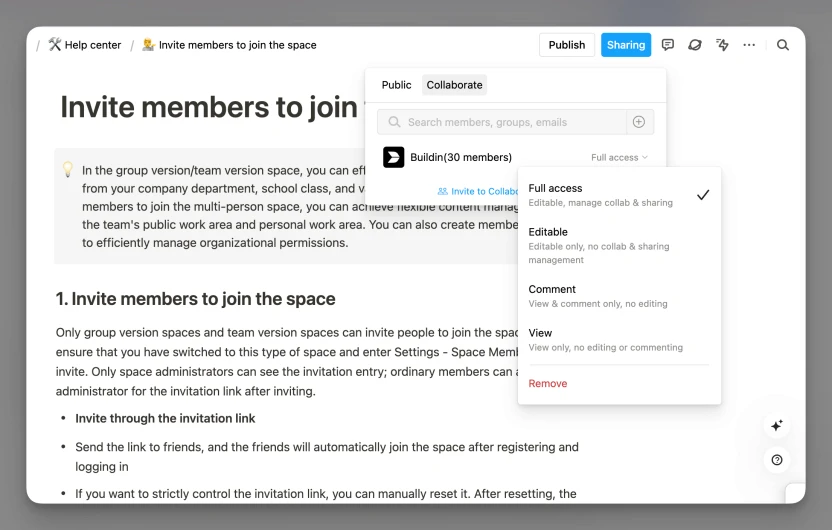
| Colaboración | Compartir una nota o una carpeta | Edición simultánea en tiempo real, permisos finos (por página o módulo), menciones con @ e hilos de comentarios | Compartir contenido vs. colaborar en el proceso |
| IA | Usa Apple Intelligence para corregir texto, dictar y resumir | Base de conocimiento con IA nativa: preguntas entre documentos, generación de contenido y resúmenes con contexto | Asistencia pasiva vs. impulso activo |
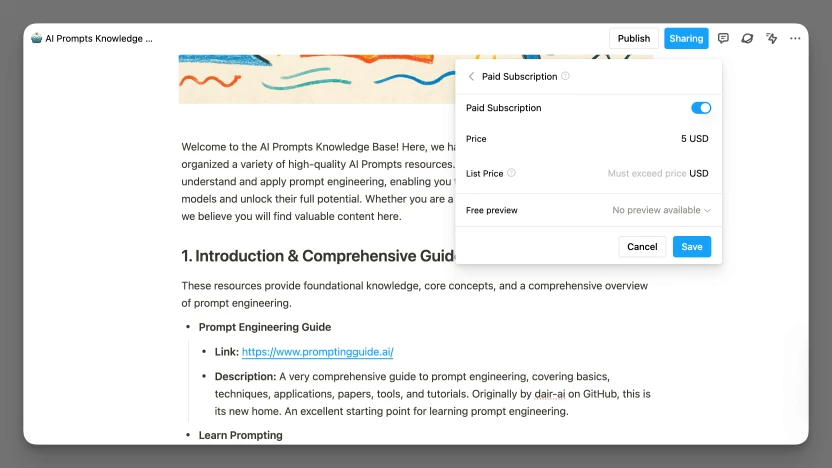
| Monetización | No disponible | Muro de pago y suscripciones nativos: venta puntual, suscripción recurrente, cobros y gestión de miembros | Herramienta de consumo vs. de producción y venta |
| Datos y seguridad | Arquitectura de seguridad de Apple y políticas de privacidad de iCloud; cifrado de extremo a extremo maduro y protección por cuenta | Colaboración cifrada en la nube más despliegue privado de nivel empresarial: servidores propios e integración de modelos privados | Custodia del sistema vs. soberanía y elección de despliegue |
| Precio | Sincroniza por iCloud; agotados los 5 GB gratuitos, hay que pagar más almacenamiento para seguir sincronizando | Plan gratuito más suscripciones de pago (Plus ~10 $ al mes, Business ~15 $ por usuario y mes) | Ventaja preinstalada vs. pagar por capacidad profesional |
3. Casos ideales y limitaciones
Notas de Apple: virtudes y ataduras
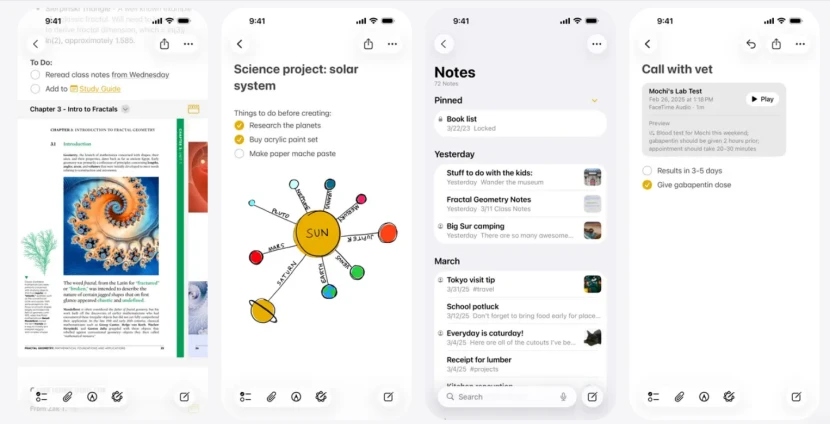
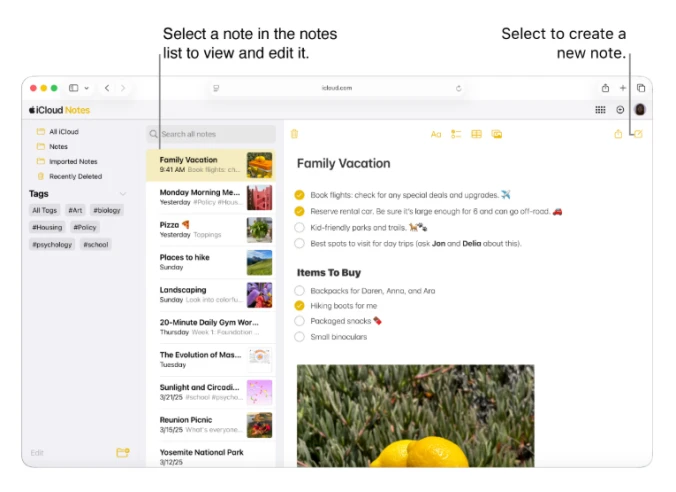
Notas de Apple brilla capturando rápido y sin fricción en dispositivos Apple: notas desde la pantalla bloqueada, escaneo de documentos, bocetos con Apple Pencil. Pero su fuerza es inseparable de su límite: solo corre de forma nativa en hardware de Apple. No hay app de Windows ni de Android, y iCloud.com es un recurso degradado. Fuera del ecosistema, o en un equipo con dispositivos mixtos, no es una solución completa.
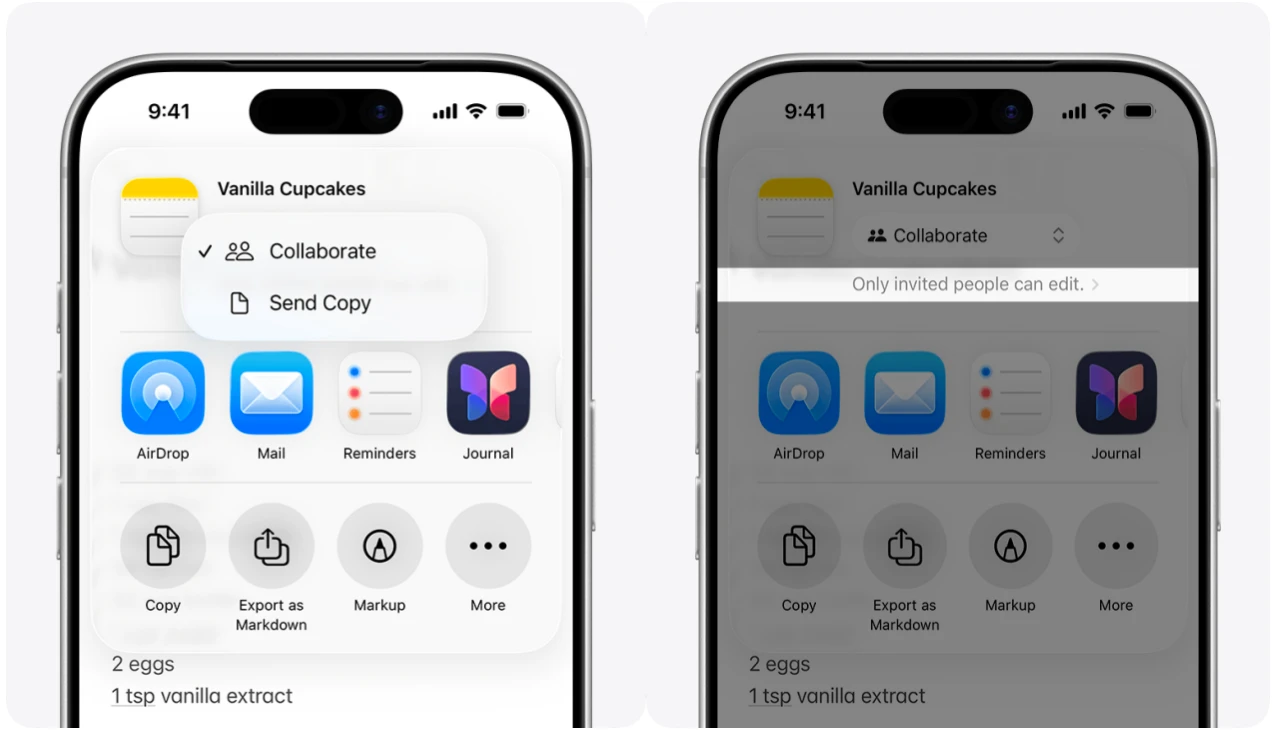
La colaboración se limita a quien tenga un ID de Apple: los usuarios de Windows y Android no pueden participar en notas compartidas ni editar en tiempo real, y no hay permisos por rol ni enlaces de invitado.
El ecosistema es solo Apple: sin app de Windows, sin cliente de Android, y la web de iCloud carece de uso sin conexión y de casi todas las funciones nativas, así que no sirve como solución multiplataforma.
Las funciones no se amplían: sin bases de datos, sin tableros kanban, sin vistas personalizadas y sin integraciones de terceros más allá de las apps de Apple.
Buildin: potencia y su curva de aprendizaje
La ventaja central de Buildin es eliminar la dependencia del dispositivo que impone Notas de Apple. Funciona en Windows, Mac, iOS y Android con las mismas funciones: un solo espacio accesible desde cualquier sitio. Eso importa si usas un PC con Windows en el trabajo, colaboras con gente sin hardware de Apple o simplemente no quieres quedarte atado a un ecosistema.
Además sustituye a varias herramientas a la vez: las notas en Notas de Apple, las tareas en Recordatorios, los documentos de equipo en Google Docs, el seguimiento de proyectos en Trello. Buildin lo reúne todo en un espacio —páginas para escribir, bases de datos para información estructurada, tableros kanban para proyectos y un asistente de IA para redactar—, accesible desde cualquier dispositivo y sin cambiar de app.
Ahora bien, esa potencia tiene un coste de aprendizaje y adaptación:
Hay que pasar del pensamiento tradicional "de carpetas" a una lógica más flexible de bases de datos y enlaces bidireccionales para exprimirla de verdad.
Y las funciones avanzadas requieren suscripción de pago.

4. Cómo elegir: guía de decisión
La elección no debería basarse solo en funciones, sino en tu flujo real y en tus dispositivos. Si usas exclusivamente hardware de Apple y sobre todo tomas notas personales, Notas de Apple es rápida y gratuita. Si usas Windows (aunque sea a ratos), colaboras con gente sin dispositivos Apple o necesitas más estructura que carpetas y etiquetas, Buildin es la solución más completa.
Elige Notas de Apple sin dudarlo si:
Vives por completo dentro del ecosistema Apple: tu flujo se cierra entre iPhone, iPad y Mac.
Tu necesidad central es anotar y repasar deprisa: pensamientos sueltos, listas de la compra, notas de reuniones o guardar páginas y documentos escaneados, sin procesamiento complejo.
Priorizas coste cero y aprendizaje cero: quieres una herramienta preinstalada, gratuita y lista para usar.
Tu colaboración es mínima: solo compartes de vez en cuando una lista simple con tu familia o con un par de compañeros.
En cambio, invertir en Buildin te devolverá con creces si:
Trabajas entre plataformas: te mueves con frecuencia entre el PC con Windows de la empresa, un MacBook personal y un móvil Android.
Organizas equipos: gestionas proyectos, asignas tareas, montas bases de conocimiento y necesitas colaboración en tiempo real con permisos claros.
Creas contenido o vendes conocimiento: quieres convertir directamente tus notas, plantillas, cursos o informes en ingresos gestionables.
Manejas información compleja: necesitas etiquetado multidimensional, filtros por propiedades, cambio de vistas y conexiones visuales.
Diriges una empresa con exigencias de soberanía del dato: cumplimiento estricto, despliegue privado o integración profunda con modelos de IA propios.
No se trata de sustituir, sino de definir tu forma de trabajar
Comparar Notas de Apple con Buildin no es, en el fondo, discutir cuál es "mejor". Es reconocer dos filosofías distintas de productividad y de vida.
Notas de Apple es una "extensión del entorno": sirve a la perfección a quien vive inmerso en el ecosistema Apple y busca registrar en el instante mismo en que piensa. Es como una nota adhesiva omnipresente e inteligente —fiable, silenciosa y sin barrera de entrada—, una gran compañera para la memoria personal y la gestión ligera de información. Su fuerza está en la integración sin costuras y la ausencia de fricción.

Buildin es el "centro del sistema": apunta a profesionales del conocimiento y equipos que necesitan construir sistemas, conectar información, gestionar proyectos y, al final, crear valor. Ya no es una app de notas, sino un entorno de trabajo digital programable, ampliable y colaborativo. Su valor está en unificar un conjunto disperso de herramientas y usar estructura e inteligencia para convertir información en criterio y en resultados.
Por eso la respuesta no está en una lista de funciones, sino en cómo respondas a estas preguntas:
¿Estás documentando tu vida o construyendo proyectos?
¿Tu flujo gira en torno a la comodidad de un solo ecosistema o a la colaboración entre plataformas y entre áreas?
¿Tu necesidad central es meter y recuperar información deprisa o reorganizar, conectar y reutilizar conocimiento a fondo?
La tendencia ya está clara: la IA está pasando de herramienta pasiva a socio activo, y los flujos de trabajo van de la fragmentación a la integración. Notas de Apple representa la cima de la inteligencia nativa y la experiencia sin costuras dentro de un ecosistema; Buildin dibuja el plano de un espacio de trabajo con IA abierto y todo en uno.
Al final no existe la herramienta "mejor", sino el sistema "más adecuado". Entiende cómo funciona tu mundo de información y elige al compañero que se convierta en una extensión natural de tu pensamiento, no en una carga añadida.
5. Preguntas frecuentes: alternativa a Notas de Apple para Windows
P: ¿Existe una app de Notas de Apple para Windows? R: No. Notas de Apple no tiene aplicación nativa para Windows. La única salida es iCloud.com en el navegador, mucho más limitada que la app de iOS o Mac y sin acceso sin conexión.
P: ¿Cuál es la mejor alternativa a Notas de Apple para Windows? R: Buildin es la más parecida: escritura limpia, más bases de datos, colaboración e IA, todo disponible en Windows desde el navegador o la app de escritorio y con las mismas funciones. Notion y Obsidian son otras opciones populares, según si necesitas bases de datos o almacenamiento local.
P: ¿Sirve Notas de Apple para colaborar en equipo? R: Solo dentro del ecosistema Apple. Todos los participantes necesitan un ID de Apple y un dispositivo Apple. No hay permisos por rol, ni acceso de invitado para quien no use Apple, ni forma de compartir en tiempo real con alguien en Windows.
P: ¿Funciona Buildin en Windows? R: Sí. Buildin funciona en Windows, Mac, iOS, Android y en cualquier navegador con todas sus funciones. No hay diferencias entre plataformas.
P: ¿Se puede usar Buildin gratis? R: Sí. El plan gratuito incluye páginas ilimitadas para uso individual, 2 GB de almacenamiento, 5 MB por archivo, hasta 5 colaboradores y 500 créditos de IA para empezar, sin necesidad de tarjeta.

Lisa Wang
Attentive to the details of digital writing and productivity tools, and experienced in shaping scattered information into structured content. Responsible for product experience documentation, user feedback analysis, and initial content drafting at Buildin.