Semester Dashboard Template
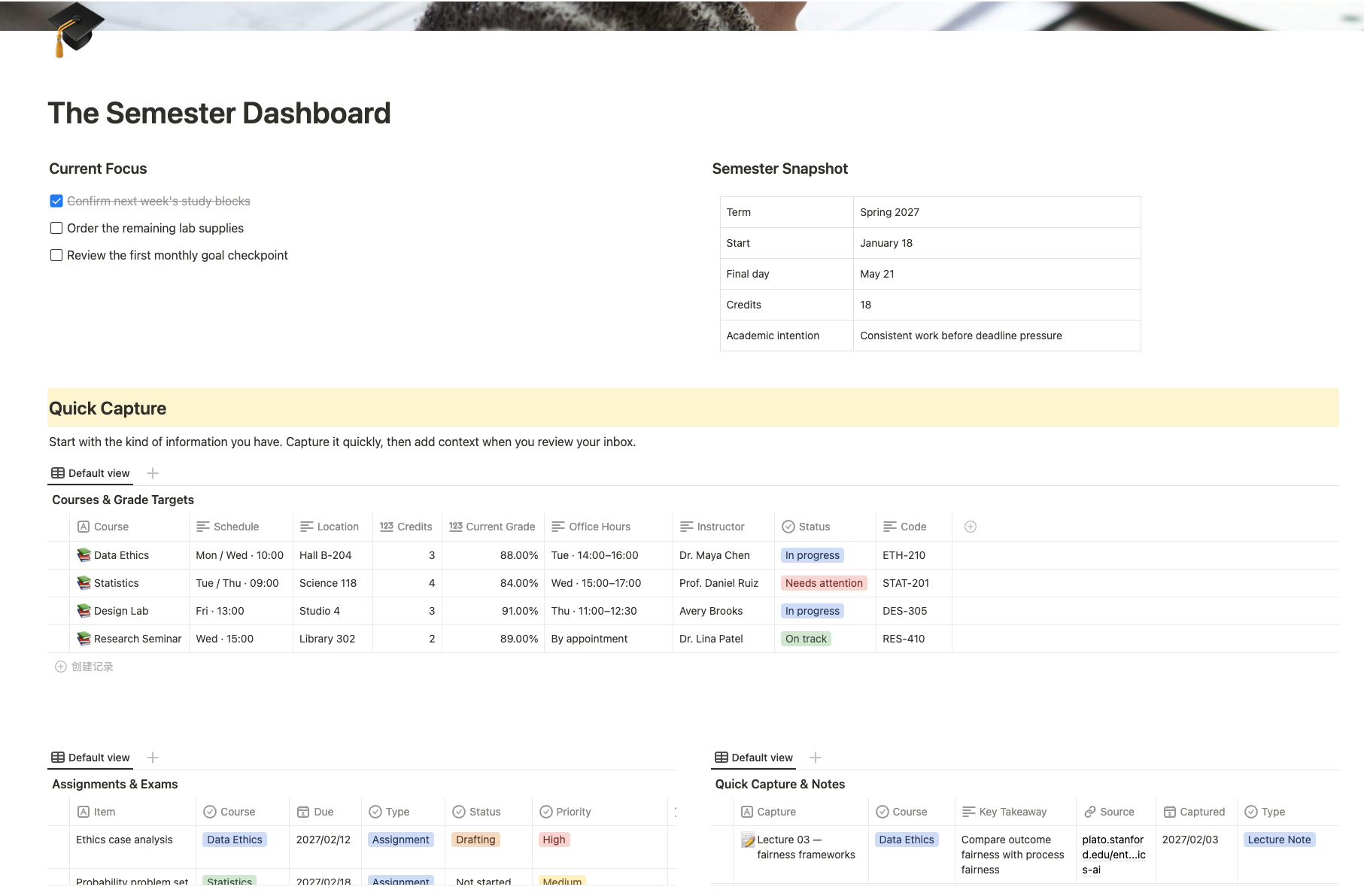
Organize courses, assignments, exams, notes, goals, schedules, and budgets in one complete academic planning workspace.
Organize courses, assignments, exams, notes, goals, schedules, and budgets with this free Semester Dashboard template for students in Buildin.
What Is the Semester Dashboard Template?
The Semester Dashboard is an all-in-one academic planning system designed to help students manage an entire semester without scattering information across different apps and documents.
It combines daily academic work—such as courses, assignments, exams, and class notes—with broader semester planning, including academic goals, preparation tasks, weekly schedules, and study-related expenses.
Each course also has space for grade targets, instructor information, office hours, syllabus details, assessment weights, and study strategies, making it easier to understand both current responsibilities and long-term priorities.
Key Features
- Current Focus: Keep the most important tasks and checkpoints visible at the top of the dashboard.
- Semester Snapshot: Record term dates, total credits, and your main academic intention.
- Courses & Grade Targets: Manage schedules, locations, instructors, office hours, credits, and current and target grades.
- Assignments & Exams: Track deadlines, course categories, assessment types, priorities, status, weight, and the next study action.
- Quick Capture & Notes: Save lecture notes, reading notes, questions, resources, and ideas before they are forgotten.
- Weekly Class Schedule: View your recurring classes and study commitments in one timetable.
- Semester Goals: Set meaningful academic, wellbeing, career, and community goals with review dates and evidence.
- Preparation Checklist: Organize enrollment, syllabus collection, technology setup, and other beginning-of-semester tasks.
- Supplies & Budget: Compare estimated and actual costs for books, materials, software, and transportation.
How to Use the Semester Dashboard
- Add the semester dates, total credits, and your main academic intention.
- Enter each course with its schedule, instructor, location, and grade target.
- Add assignments and exams with deadlines, weights, priorities, and next study actions.
- Capture notes, questions, resources, and ideas throughout the week.
- Review the weekly class schedule and update your current focus regularly.
- Set a small number of semester goals and define how progress will be measured.
- Complete the preparation checklist before classes become busy.
- Track semester purchases and compare planned costs with actual spending.
Keep the Whole Semester Connected
The Semester Dashboard brings everyday academic work and long-term semester planning into one clear system. By keeping courses, deadlines, notes, goals, schedules, and expenses connected, students can stay organized, reduce last-minute pressure, and make steady progress throughout the semester.