How teams adopt AI in a shared digital workspace, one workflow at a time
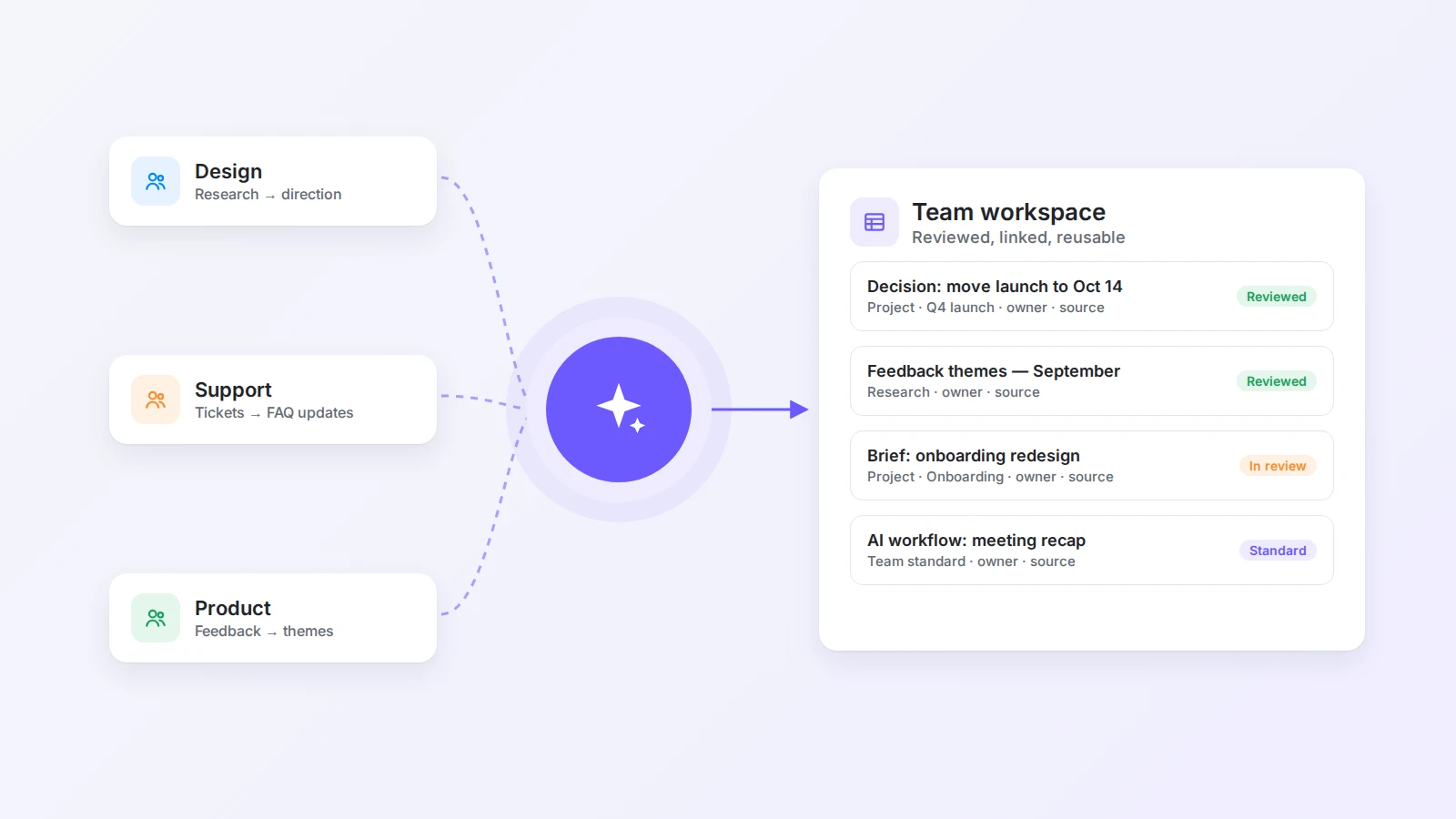
The most valuable use of AI at work is often the least dramatic: the moment a decision stops living in one person’s memory and becomes useful to the whole team. Here is how to adopt AI in a shared workspace through small, reviewed, documented workflows.
People use AI to write drafts, summarize meetings, analyze data, and answer questions that once took hours of searching. But the most valuable use of AI at work is often less dramatic. It is the moment a decision stops living in one person’s memory and becomes useful to the whole team.
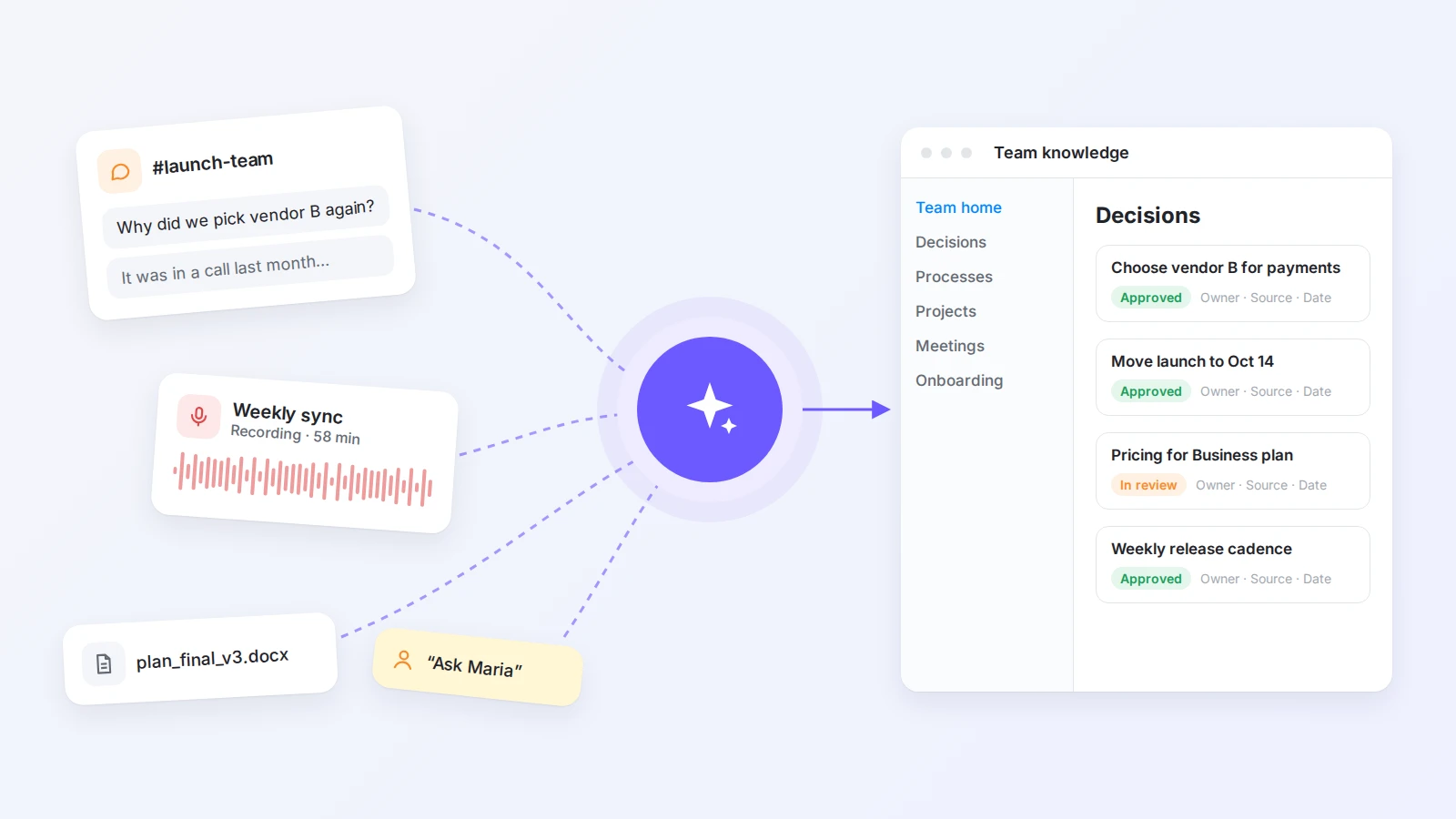
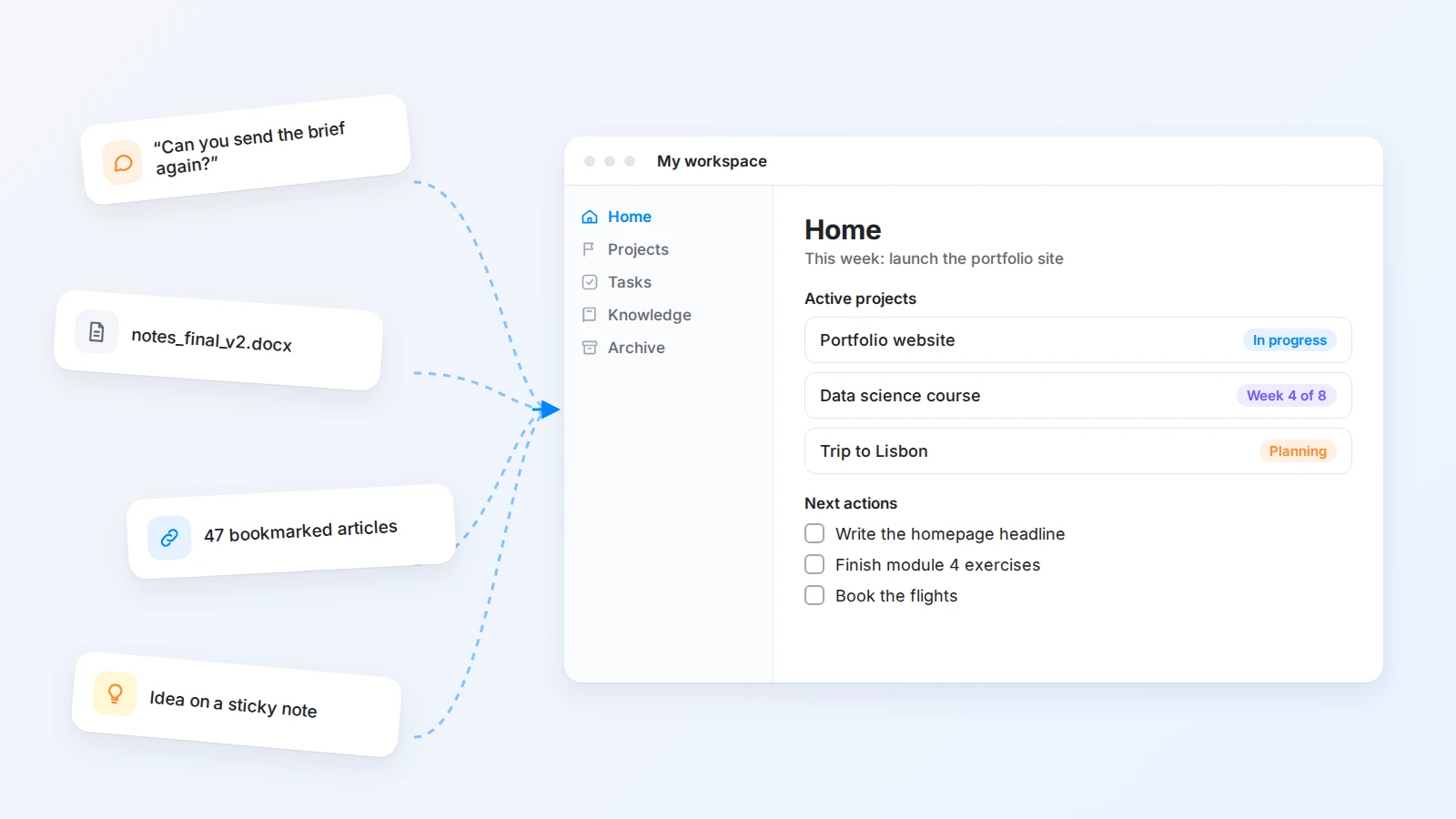
A project update in a chat thread becomes a clear status note. A long meeting transcript becomes a list of decisions and open questions. A pile of scattered references becomes a brief that lets someone start work without asking the same questions again.
This is where AI and a digital workspace work well together. AI turns raw information into something structured; the workspace gives that result a reliable home. One provides speed, the other provides continuity.
The goal is not a system that automates every part of work. It is a shared environment where teams find context faster, make better decisions, and spend more time on work that needs judgment. This guide covers how to adopt AI that way: where to start, how to experiment safely, what to measure, and how to build trust.
The short answer
To adopt AI in a team, pick one repeated handoff that costs people time or context, such as meeting recaps or project briefs. Keep the source material in a shared workspace, use AI to produce a first draft, and have a named owner review it before it becomes part of the record. Document every workflow that works — input, prompt, expected output, review step — so others can reuse it. Measure adoption, quality, and knowledge reuse, not just minutes saved, and write down simple rules for what information AI may use and which decisions it cannot make.
The real opportunity is not another AI shortcut
Most teams do not need more places to generate text. They need fewer places where important context disappears.
A typical project involves a planning document, a group chat, a task list, a few meetings, several links, and decisions made in passing. Each piece makes sense on its own, but the meaning of the project is spread across all of them. New teammates have to ask for background. Existing teammates repeat explanations. Managers spend time collecting updates instead of helping solve the real problems.
AI helps here because it works well with messy, natural-language information. It can spot repeated themes, connect related notes, summarize a discussion, and turn a vague request into a clear next action. A digital workspace makes those results reusable: once a summary has a page, a project, or a place in the knowledge base, someone else can find it and improve it.
The strongest teams are not treating AI as a replacement for thinking. They use it to reduce the cost of preparing to think.
Start with small wins that remove daily friction
Useful AI adoption usually begins with work that is repetitive, visible, and easy to evaluate. A team does not need to redesign its operating model first. It can start with the moments that already cause unnecessary delay.
| Team | Repeated handoff | AI-assisted version |
|---|---|---|
| Any team | Turning meeting notes into follow-ups | Draft of decisions and action items, checked by the host |
| Content | Turning research into a brief | Brief and outline drafted from the research page |
| Product | Reading scattered customer feedback | Feedback grouped by theme before prioritization |
| Operations | Checking what changed in a process | Side-by-side comparison of old and new versions |
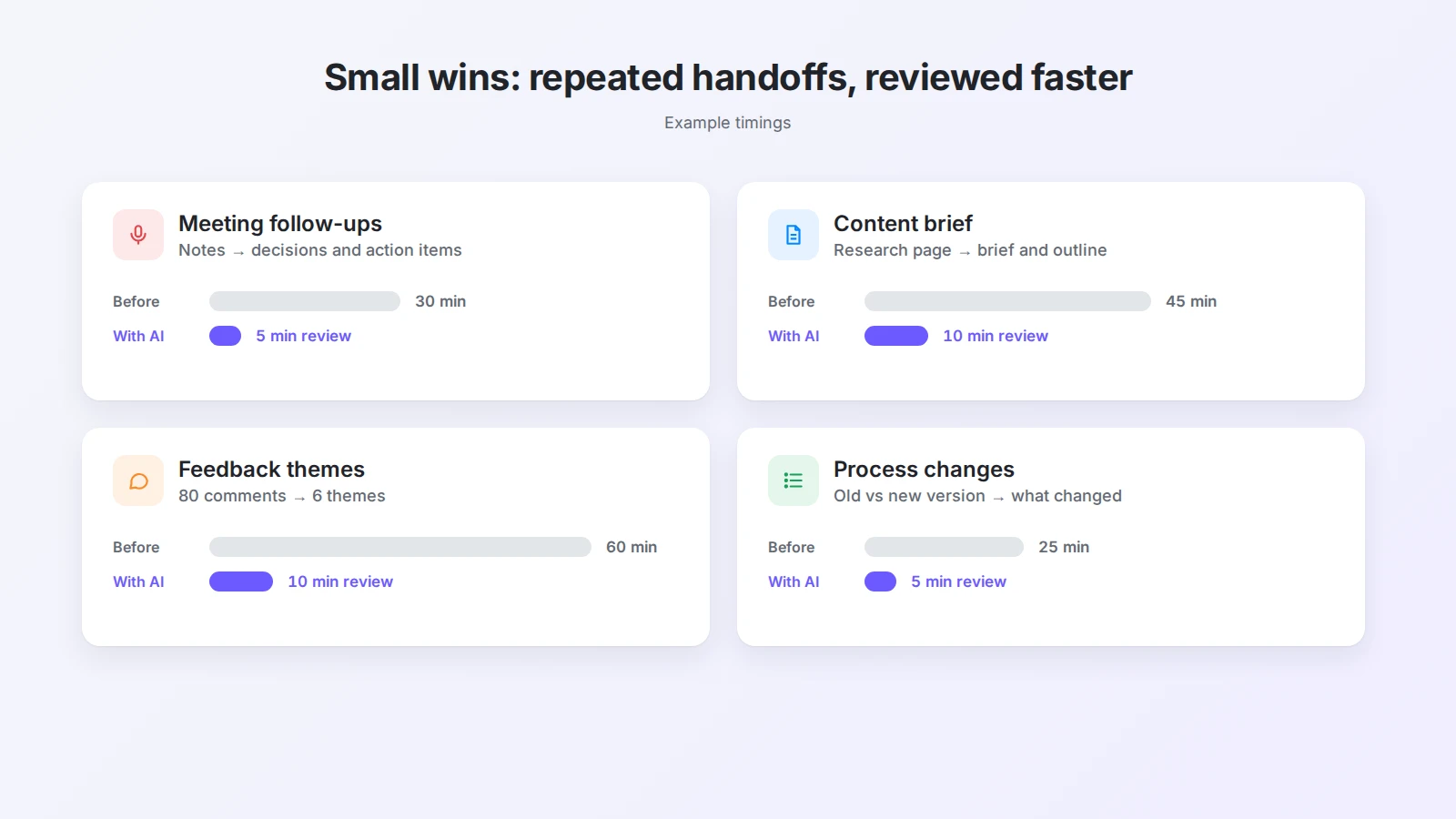
None of these is spectacular, but each is valuable because people see the result immediately. When a task that took thirty minutes becomes a five-minute review, the team has evidence that AI is useful in its own environment, not just in a demo.
The question to ask is not “Where can we add AI?” It is “Which repeated handoff makes people lose time or context?” That question leads to practical experiments instead of novelty projects.
Make information ready for AI and for people
AI cannot create shared understanding from information nobody can find. Before asking a model to summarize, classify, or connect knowledge, a team needs a reasonable place to keep the source material.
That does not mean every page must follow a strict template. It means important information carries enough context to be interpreted later:
- A project page makes the outcome clear.
- A decision note records what was decided and why.
- A research page separates source material from the team’s own conclusions.
A good digital workspace gives each kind of information a natural home: projects describe outcomes, tasks describe actions, notes preserve context, knowledge pages capture reusable ideas, and an archive keeps finished work available without competing with current priorities. Our guide to creating a digital workspace walks through that structure step by step.
When those relationships are visible, AI can help the team move between them. A project discussion becomes a decision record, the decision links to the task it created, and a research note links to the project that uses it. That is far more useful than isolated summaries, because the information stays connected to the work it supports.
Use AI to create a shared starting point
One of the simplest ways to use AI in a team workspace is to produce a shared first draft: a project brief, a meeting recap, a customer insight summary, a launch checklist, or a weekly update. AI does not need to produce the final answer. Its job is to remove the blank page and make the next human step obvious.
For example, a project lead can collect the notes for a new initiative and ask:
Using the notes on this page, draft a project brief with five sections: goal, constraints, open questions, risks, and next actions with owners. Use only what is in the notes and mark anything uncertain as [CHECK]. Keep it under 300 words.
The team then corrects the draft, adds missing context, and decides what belongs in the project record. The value comes from the conversation that follows, not from pretending the first output is perfect. In Buildin you can run this on the page itself with the in-page AI, or ask Buildin Agent to read several pages and databases and save the brief back to the project. For more prompt ideas, see our collection of AI prompts for work in Buildin.
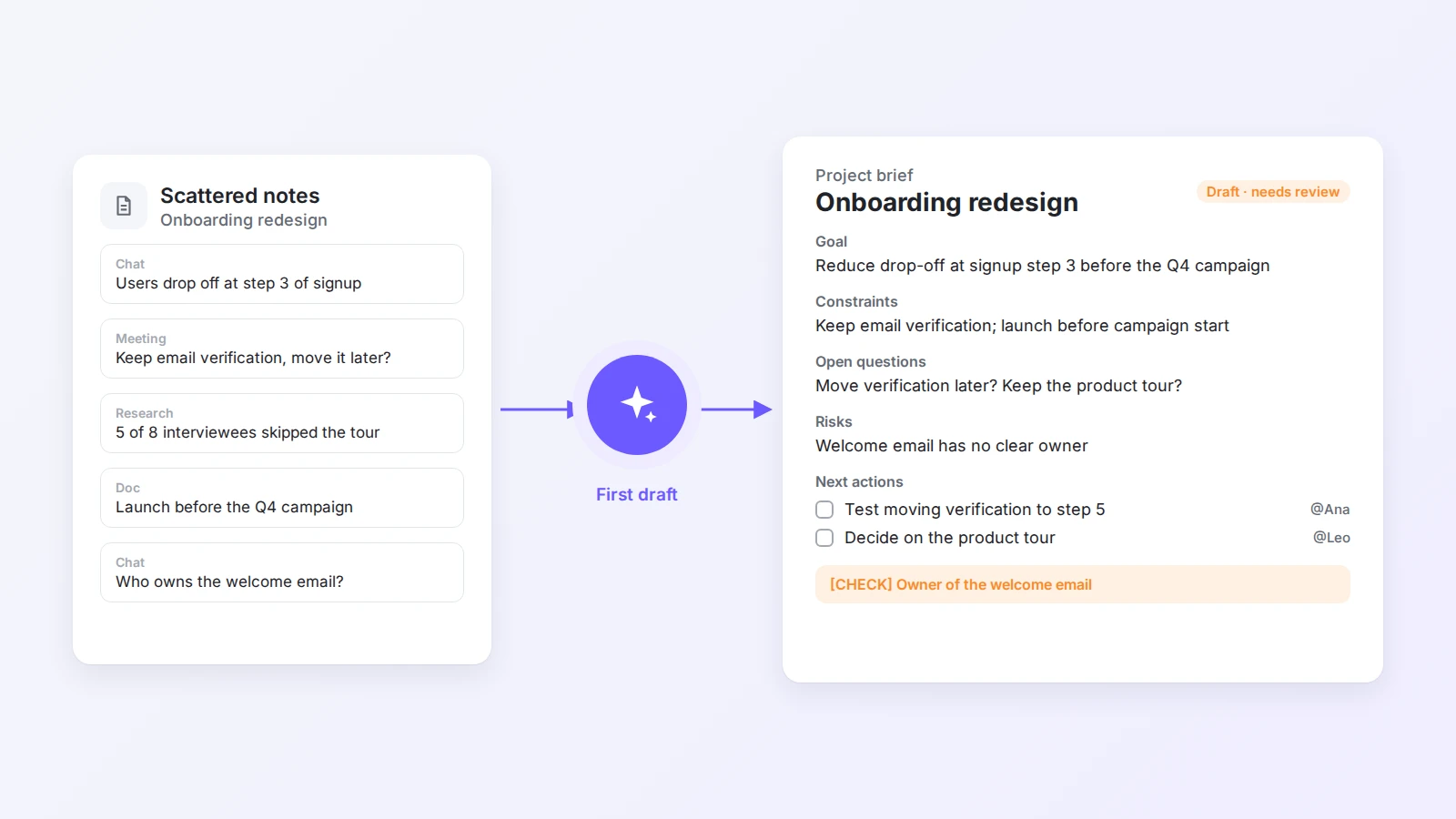
This also improves onboarding. Instead of a folder of links and “have a look around,” a new teammate starts with a short, reviewed explanation of what the team is doing and where the important context lives.
Encourage experimentation without creating chaos
The best way to introduce AI is not to force everyone into the same prompt or workflow. Teams have different responsibilities, and the most useful experiments usually come from people who know a specific process deeply.
- A designer finds a better way to turn research into an initial direction.
- A recruiter organizes interview feedback while final judgment stays with the hiring team.
- An engineer asks AI to explain an unfamiliar code path before changing it.
- A support team groups recurring questions and uses the patterns to improve documentation.
Leadership’s role is to set safe boundaries around this experimentation. People should know what information is appropriate to use, what needs review, and which decisions cannot be delegated to AI. They also need one place to share useful discoveries, failed experiments, and examples others can adapt.
Buildin can be that shared learning layer. Keep an AI workflows database where each experiment is a page linked to the process it improves, with the prompt, an example output, the review step, and a status such as experiment, trial, or team standard. Over time, individual curiosity becomes organizational knowledge.
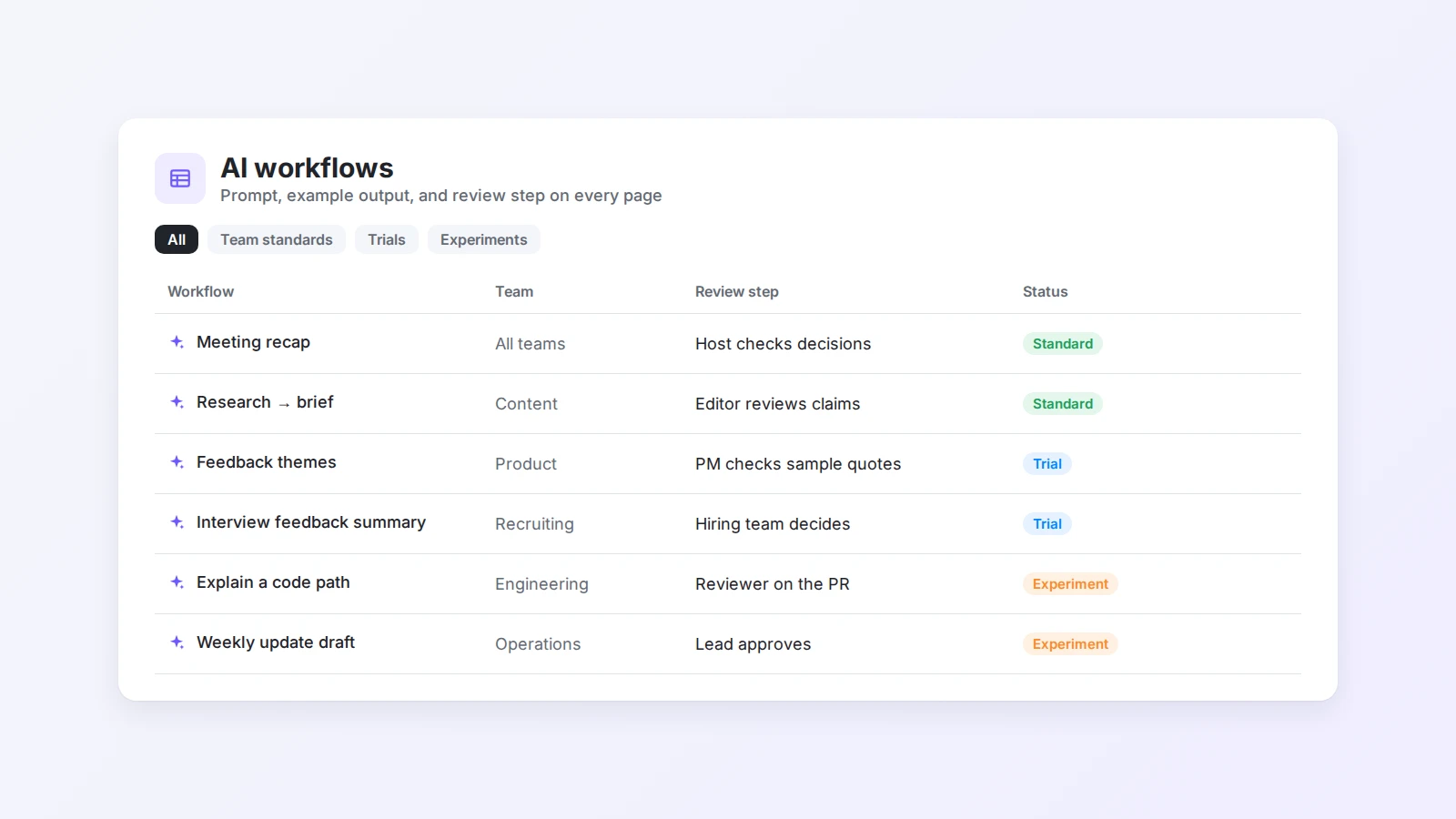
Two habits that make AI adoption stick
- Keep a human review step. Every AI-generated summary, classification, or draft that matters should have an owner who checks that it is accurate, complete, and appropriate for the decision at hand. Review does not mean rewriting everything. It means making responsibility visible.
- Document what worked. When a team finds a useful AI workflow, capture the input, the prompt, the expected output, the review criteria, and when it applies. A successful experiment that stays in one person’s chat history can never become a team capability.
Turn meetings into durable project knowledge
Meetings are where important decisions are made and where important knowledge most often disappears. A transcript alone does not fix that: it preserves every word while leaving the team unsure what actually matters.
A good meeting workflow has three parts:
- Capture the conversation, with notes on a shared page or an AI meeting notes tool.
- Draft with AI: separate decisions from discussion, list action items with owners, and surface open questions.
- Place the reviewed result on the project page and link each action to its task.
The third step is what turns a temporary conversation into shared memory. The next person who opens the project sees what was decided without watching a recording, and the person responsible for an action can find the reason behind it. We cover this workflow in detail, including a ready-to-use prompt for decision records, in how teams are using AI to turn scattered work into shared knowledge.
Use AI to find patterns across projects
Teams often have valuable knowledge but no practical way to see patterns across it. Customer feedback sits on separate pages. Retrospectives are written but rarely compared. Project delays are discussed again and again without a shared record of the causes.
AI is well suited to this kind of synthesis. It can compare notes across projects, group recurring issues, highlight similar decisions, and flag questions that show up in several places. It does not tell a team what to do. It gives the team a better view of the evidence before it decides.
- A product team reviews feedback from several launches and sees where users keep struggling.
- A marketing team compares campaign retrospectives and notices that approvals, not writing, cause most delays.
- An operations team looks across project notes and finds that the same manual handoff keeps creating errors.
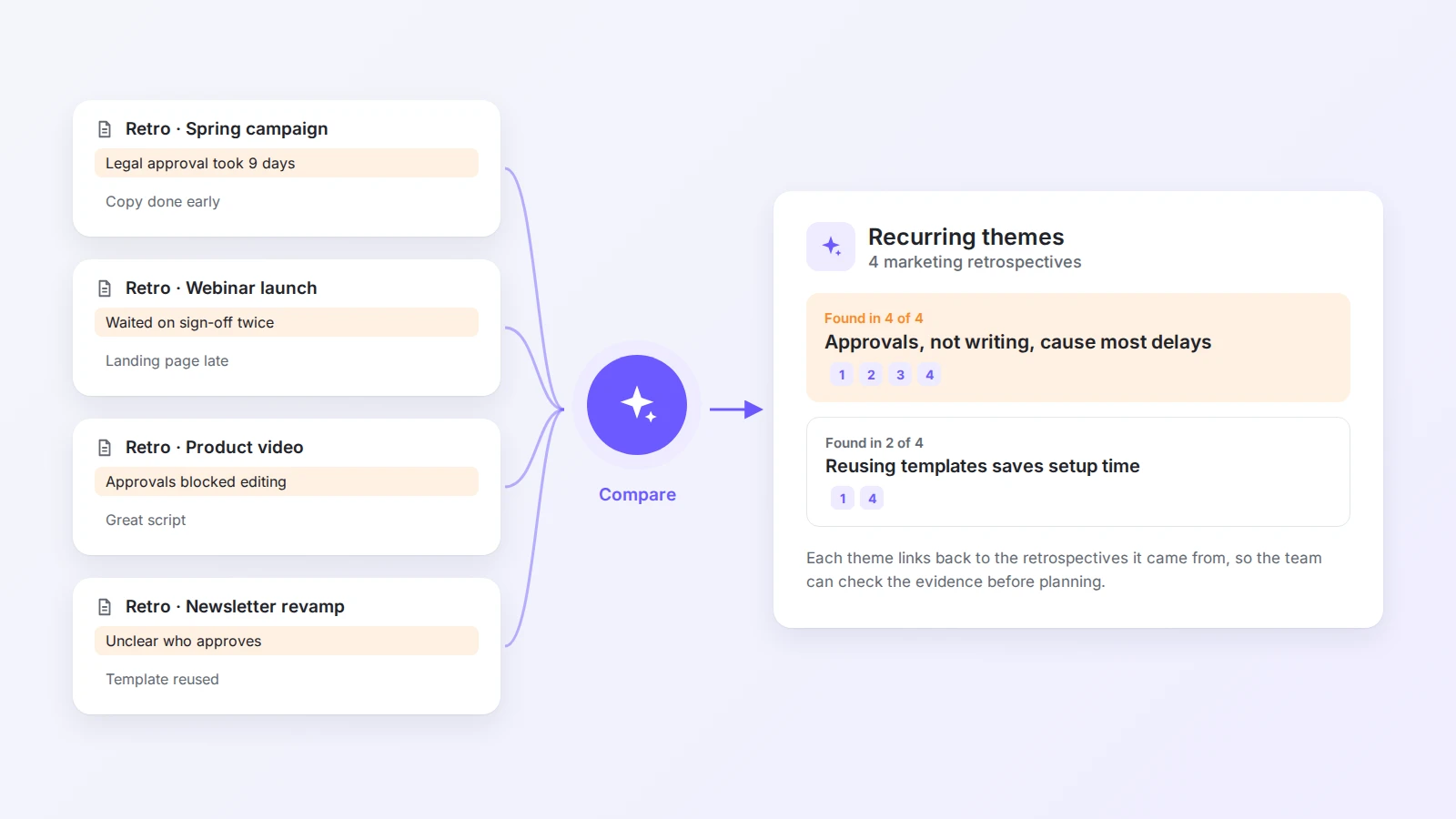
The workspace matters because the pattern should stay connected to its sources. A conclusion is more trustworthy when a teammate can open the notes behind it. Buildin AI answers questions across pages and databases with links to the source pages, so anyone can check the evidence. AI makes synthesis faster; traceable context makes it useful.
Build a lightweight system for learning
AI capabilities change quickly, so teams need a way to learn without turning every week into a tool evaluation.
A lightweight system can be as simple as:
- The AI workflows database described above.
- A record of experiments, including ones that failed and why.
- Examples of good and bad outputs for each workflow.
- A short set of usage guidelines.
- A feedback page where people note what saved time, what introduced errors, and what still takes too much manual work.
The purpose is not to collect every new tool. It is to recognize which workflows are stable enough to repeat. A workflow becomes valuable when someone other than its creator can understand it, use it, and improve it.
This is why a digital workspace is a better home for AI adoption than a collection of private chats. The team can see how each experiment relates to a process, a project, or a shared standard, and the knowledge stays available after the original experiment is over.
Measure capability, not only speed
It is tempting to measure AI only by minutes saved. Time matters, but it is not the whole story. A team might produce first drafts faster while spending more time fixing errors. Another might see no immediate time savings but make better information available to more people.
A useful measurement approach looks at adoption, quality, and capability together.
| What to observe | Useful question | Example signal |
|---|---|---|
| Adoption | Is the workflow becoming part of normal work? | More projects use the shared meeting recap process |
| Time | Does it reduce repetitive effort? | Less time spent turning notes into updates |
| Quality | Is the output more complete or consistent? | Fewer missed decisions and follow-ups |
| Knowledge | Can more people find and reuse the result? | New teammates understand project context faster |
| Capability | Does the team make better decisions? | Patterns across projects surface before planning begins |
The goal is not to prove that AI is always faster. It is to understand where AI helps the team create, find, and apply knowledge with less friction.
No shortcuts: trust is part of the workflow
AI adoption slows down when people do not know whether they can trust the result. A confident but wrong summary can create more work than no summary at all. A sensitive document can create unnecessary risk if nobody knows how it should be handled.
Trust does not come from a single policy document. It is built into the workflow: clear ownership, review expectations, information boundaries, and a way to report mistakes. When an AI-generated result influences an important decision, the original context should stay one click away.
A practical guideline answers five questions:
- What information may be used with AI?
- What must be reviewed, and by whom?
- Which outputs can be shared directly?
- Which decisions require a responsible person?
- Where is the final result documented?
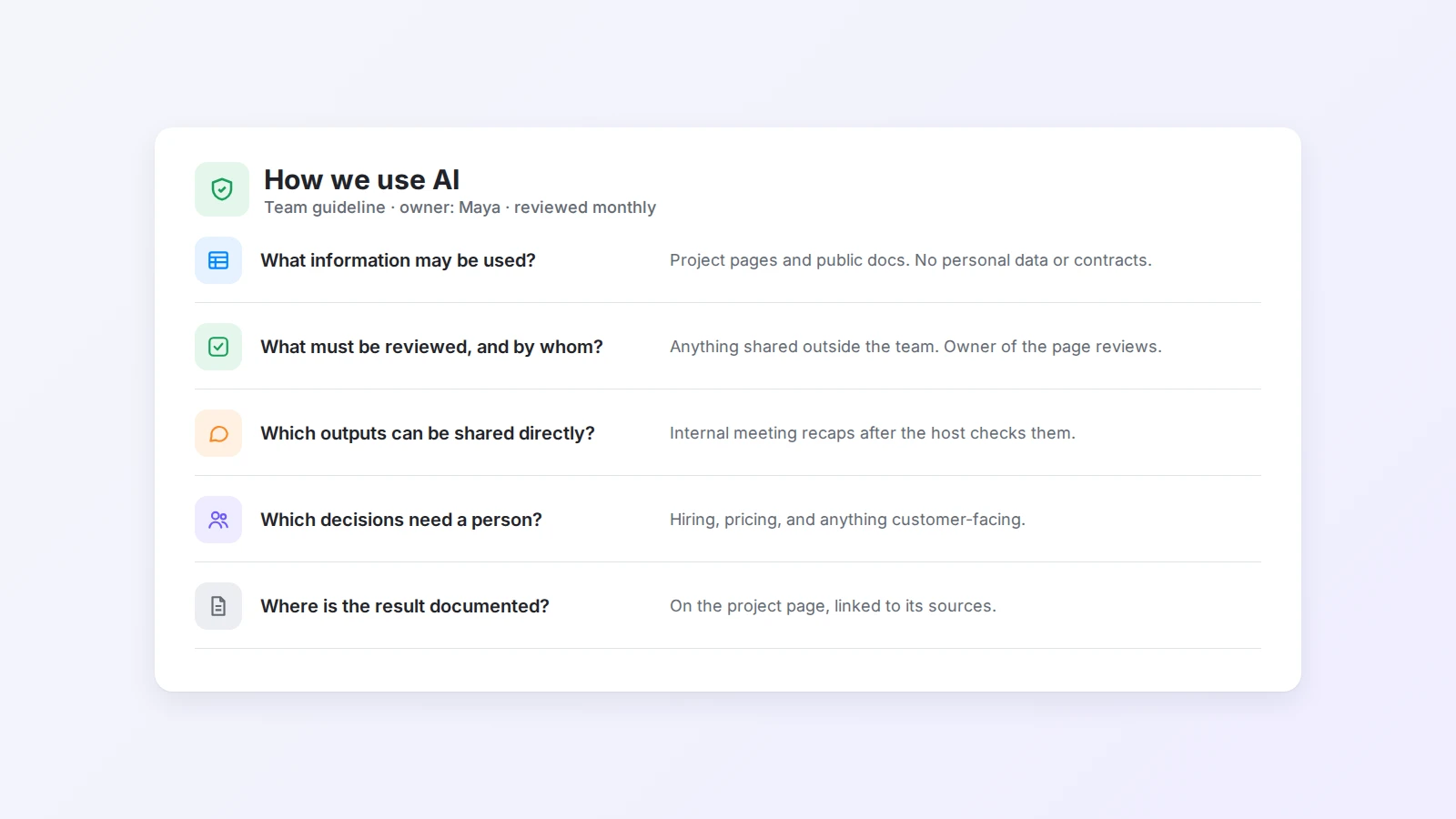
When the answers are visible in the workspace, people experiment with more confidence. They no longer have to choose between using AI recklessly and avoiding it completely. For teams with strict data requirements, Buildin also offers private deployment, so documents and AI queries stay on your own infrastructure.
The future belongs to teams that keep learning
AI is still developing, and the most useful workflows will keep changing. The teams that benefit most will not be the ones that predict every future capability. They will be the ones that can test an idea, evaluate the result, document what they learned, and improve the process.
A digital workspace gives that learning a place to accumulate. A small experiment becomes a documented workflow. A workflow becomes a team template. A template produces better project data. Better project data supports more useful analysis the next time.
That loop matters more than any single feature. AI helps teams move faster; shared knowledge helps them move forward together.
The best starting point is close to the work: one repeated task, one clear owner, one review step, and one place to keep the result. From there, a team can build an AI practice that is practical, accountable, and connected to the way it already works.
To begin, create a shared workspace in Buildin for your projects, decisions, meeting notes, experiments, and reusable workflows. Start with the information your team already has, then use AI to make it easier to understand and act on.

Jacbo Jensen
Focuses on knowledge management and productivity tools, with experience in building content systems and creator workflows. Responsible for researching "AI × Writing Systems" and content productivity at Buildin, exploring more efficient ways to organize and produce knowledge.