RACI Chart Template
Assign project responsibility with a blank RACI matrix, a complete website relaunch example, a role legend and a checklist for reviewing ownership.
Make ownership clear before work starts. This RACI chart template maps project deliverables and decisions to the people who do the work, own the result, provide input and receive updates. It includes a blank responsibility matrix, an original website relaunch example and a review checklist.
Download the RACI chart template in Markdown. The free download includes both matrices, the legend and the checklists; no account is needed to download it.
What does RACI stand for?
A RACI chart, also called a RACI matrix or responsibility assignment matrix, places deliverables down the left and people or roles across the top. Each cell records how that person participates. The four assignments are:
| Letter | Role | Meaning |
|---|---|---|
| R | Responsible | Does the work. Each deliverable needs at least one R. |
| A | Accountable | Owns the final result and its acceptance. Each deliverable needs exactly one A. |
| C | Consulted | Gives input before a decision or result is finalized. Communication goes both ways. |
| I | Informed | Receives updates about progress or decisions. Communication is one-way. |
These conventions follow Atlassian’s RACI guidance. A blank cell means no assigned involvement in that row. When the same person both does and owns the work, use A/R in that person’s cell and count it as both assignments.
RACI chart example: a website relaunch
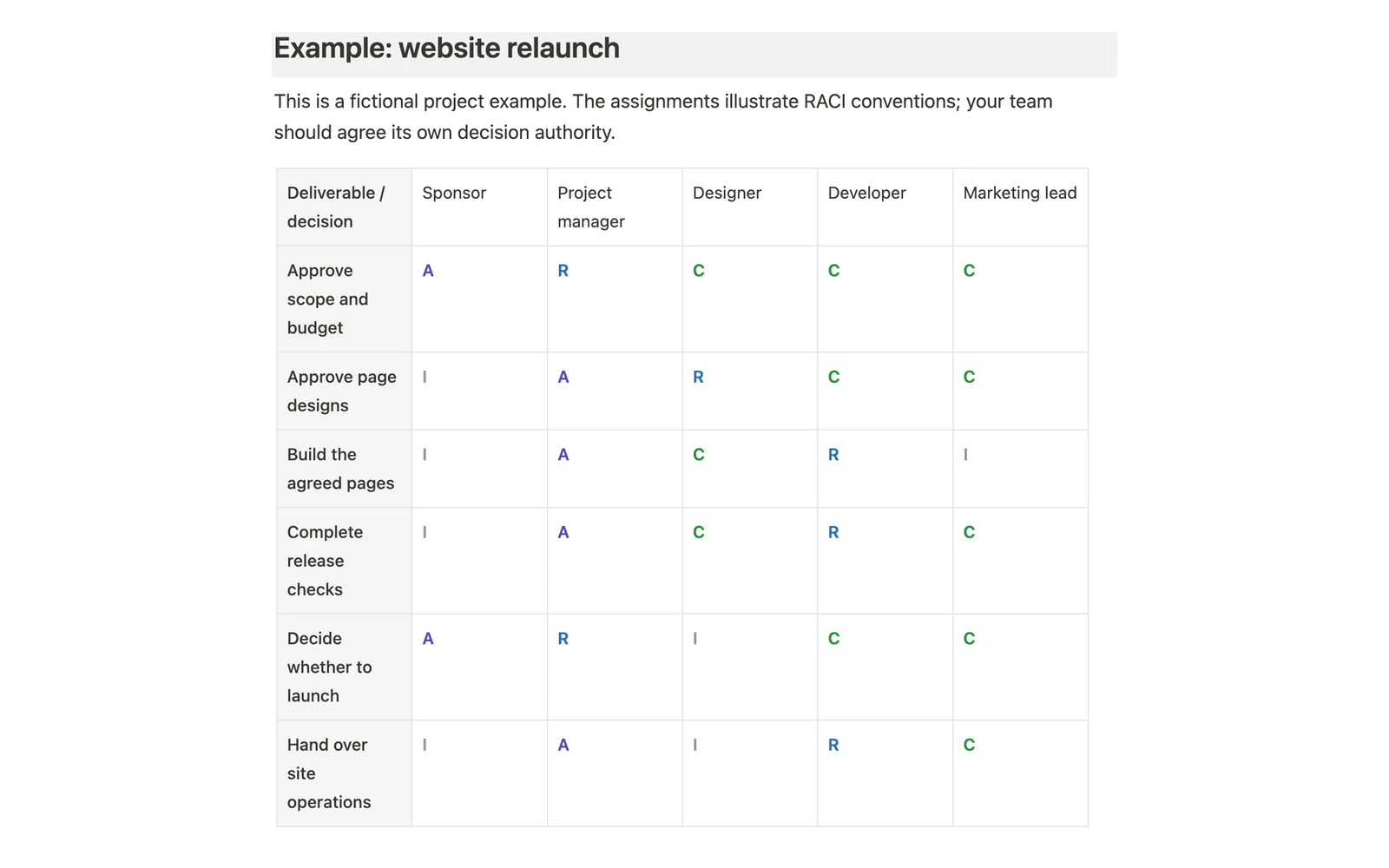
This fictional example uses five project roles and six deliverables. Each row has one accountable role and at least one responsible role. Replace the roles with named people before your team agrees its own chart.
| Deliverable or decision | Sponsor | Project manager | Designer | Developer | Marketing lead |
|---|---|---|---|---|---|
| Approve scope and budget | A | R | C | C | C |
| Approve page designs | I | A | R | C | C |
| Build the agreed pages | I | A | C | R | I |
| Complete release checks | I | A | C | R | C |
| Decide whether to launch | A | R | I | C | C |
| Hand over site operations | I | A | I | R | C |
For “Approve page designs,” the designer prepares the work, the project manager accepts the result, and the developer and marketing lead provide input. The sponsor receives an update. These are illustrative assignments, not universal job responsibilities.
Blank RACI matrix template
Write a specific deliverable or decision in each row, then replace the column names with your team. Use R, A, C, I or A/R as appropriate; leave unrelated cells empty.
| Deliverable or decision | Person 1 | Person 2 | Person 3 | Person 4 | Person 5 |
|---|---|---|---|---|---|
| Your deliverable | |||||
| Your decision | |||||
| Your handoff |
The downloadable template adds a team directory, project brief, approval and communication notes, and a change log alongside the blank matrix.
How to fill out a RACI chart
- Define the scope. State which project or process the chart covers. Include decisions and handoffs where ownership is unclear.
- List deliverables. Use reviewable outcomes such as “Approve page designs,” rather than broad labels such as “Design.”
- Name the people. Replace generic departments with people wherever possible. A team can contribute to work, but acceptance authority must be clear.
- Assign A and R first. Give each row exactly one A and at least one R. Confirm that the accountable person has the authority to accept the result.
- Add C and I selectively. Consult people whose input is needed and agree when informed stakeholders receive updates.
- Review together. Resolve disputed assignments and overloaded columns with the people involved, then record the agreed version.
Review the matrix when scope, team membership or decision authority changes. Use the change log to record what changed and who will resolve open assignments.
Check the matrix before using it
- A row with no A has no clear owner for acceptance.
- A row with two As leaves final authority split; choose one accountable person.
- A row with no R has an owner but nobody assigned to do the work.
- A column with many Rs may show a capacity problem worth discussing.
- A row with too many Cs may require more consultation than the task needs.
These checks are manual in the Buildin and Markdown versions. The template does not automatically validate assignments or calculate workload.
RACI chart versus a project plan
The RACI matrix answers who participates and with what responsibility. It does not set delivery dates, sequence dependencies or replace a task tracker. Pair it with a Project Roadmap Template when you also need to show milestones and expected outcomes.
For repeatable process instructions, use the existing Project Management SOP Template. Keep the procedure there and use the RACI matrix to agree responsibility for its deliverables and decisions.
Frequently asked questions
Is a RACI chart the same as a RACI matrix?
Yes. Both names describe the table that assigns Responsible, Accountable, Consulted and Informed roles to project work. “Responsibility assignment matrix” is another common name.
Can one person be both responsible and accountable?
Yes. Use A/R when one person both performs the work and owns its acceptance. Count that cell as both R and A when checking the row; do not add another A elsewhere.
Can a task have more than one accountable person?
Under the convention used here, each row has exactly one A. If two approvals are separate decisions, split them into distinct rows with their own accountable person.
Is there an Excel or Google Sheets version?
The download provided here is Markdown, and the Buildin version uses editable tables. There is no dedicated Excel workbook or Google Sheets copy included on this page.
When is a RACI chart useful?
Use it when a project crosses roles or teams and people need to agree who does, accepts, advises on or hears about the work. A small task with one clear owner may not need a separate matrix.
Does the chart replace agreement with the team?
No. Review assignments with the named people and resolve authority or capacity issues before treating the chart as agreed. Writing a letter in a cell does not establish acceptance on its own.